
Sales & Lead Management
An enterprise B2B SaaS ecosystem designed to centralize lead management, dealer engagement, approvals, and performance tracking through a mobile app for field teams and a web admin portal for sales leadership in the paint industry.

Enterprise UX
Enterprise Logistics
Strategic Sales Operations
Project Snapshot
-
Sales teams operated across 3+ disconnected tools, creating fragmented workflows
-
Approval turnaround delayed by 24–48 hours due to manual follow-ups and tool switching
-
Duplicated data entry increased rep effort by 5–7 hours per week
-
Limited cross-regional visibility reduced forecast accuracy and slowed revenue momentum
PROBLEM
SOLUTION
-
Launched a mobile-first app adopted by 100+ field agents, enabling real-time lead capture, status updates, and on-site reporting
-
Built a centralized web dashboard for 3 management layers, providing end-to-end visibility into pipelines, approvals, and KPI performance
IMPACT
-
Reduced lead approval TAT by 35%, cutting turnaround from ~48 hrs to <30 hrs
-
Achieved 100% real-time pipeline visibility across 3 management layers
-
Increased KPI & activity compliance to 90%+ across 150+ sales users
-
Accelerated cross-team decision cycles by 30%, reducing field–manager coordination delays
Project Details
My Role:
Duration:
Location:
UX Designer
6 Months
Pune, India
Team:
Stakeholders:
-
1 UX Designer (Me)
-
1 UI Designer
-
1 UX Lead
-
1 BA
-
2 QAs
-
2 Developers
-
Project Manager
-
Delivery Manager
-
Field Sales Representative (FSR)
-
Territory Manager (TM)
-
Area/Regional Manager (ARM/RM)
-
Head Office Marketing Analyst (HO Analyst)
-
Call Center Executive (CCE)
Tools:


Platform(s):

Design System:
My Role & Responsibilities
As the UX Designer, I coordinated closely with cross-functional teams throughout the project, leading end-to-end UX strategy, design, and cross-functional alignment.
The responsibilities outlined below were structured in alignment with the project plan, ensuring interdependent tasks were managed effectively and the product was delivered smoothly and efficiently.
-
Conducted stakeholder interviews and requirement gathering workshop
-
Analyzed the existing system to identify gaps and pain points
-
Designed low- and mid-fidelity wireframes for core workflows
-
Built interactive prototypes for key user flows
-
Conducted usability testing and iterated based on feedback
DESIGN
DEVELOP
DEFINE
DISCOVER
-
Structured the Information Architecture for the mobile app and admin portal
-
Created user personas for key roles
-
Mapped user journeys for the existing and redesigned applications
-
Finalized high-fidelity UI designs and design system
-
Supported development through handoff and clarifications
-
Assisted in QA testing and post-design refinements
Business Goals
Reduce sales cycle time by 20–30% by improving real-time visibility into field activities, dealer interactions, and project progress
1
Increase lead-to-order conversion by 15–25% by strengthening lead quality, prioritization, and follow-through across contractor and project pipelines
2
Cut manual reporting effort by 60–70%, freeing up ~5–7 hours per rep per week by removing duplication and process inefficiencies
3
Improve sales forecast accuracy by 20%+ by enabling consolidated, timely, and reliable performance insights across regions and product categories
4
Achieve 90%+ activity and task compliance across the sales hierarchy to drive ownership, transparency, and execution discipline
5
Ensure 100% adoption across sales personas to support scalability, consistency, and faster expansion into new regions and dealer networks
6
Competitive Research
Before defining persona-driven goals, we intentionally grounded the design direction in a competitive market analysis to ensure decisions were objective, scalable, and aligned with industry realities.

Legends

Partial or fragmented capability

Strong / native capability

Missing or not clearly supported
Gaps Identified
Competitive analysis revealed gaps in connecting field execution, managerial approvals, and performance analytics within a single system (Competitor 1, 2, and 3).
Proposed System:
Our proposed system addresses this with a role-based, field-first ecosystem that supports the complete lead-to-conversion journey while enabling data-driven decisions across the sales hierarchy.
User Persona
User personas were created to validate and contextualise the identified user goals, anchoring them in real-world behaviours, environments, and constraints.


Insights
Governance was an afterthought in the existing process
Field reps were losing 5–7 hours a week to duplication
Approval decisions were made without enough context
Managers had visibility into their own territory but not across it
Field teams needed speed above everything else
Project Goals
By aligning validated user needs with business priorities, we translated research insights into clear, outcome-driven project goals
01. Unified Mobile App for Field Teams
For Field Sales Representative
-
Create and manage leads end-to-end
-
Record and track dealer/customer visits
-
Provide estimations and quotations as required
-
Update lead pipeline stages (Pipeline → Converted → Lost)
-
Track personal KPIs such as conversions and sales contribution
For Territory Manager / Supervisor
-
Monitor reporting field staff and their activities
-
Approve or reject leads from influencers, architects, dealers, etc
-
View territory-level dashboards and performance insights
-
Track dealer-specific sales and visit completion
-
Manage escalations and ensure lead follow-ups
02. Admin Portal (Web Application)
For Super Admin
-
Manage user roles, hierarchy, and permissions
-
Configure workflows, forms, and approval paths
For Head Office / Marketing Teams
-
Analyze nationwide sales patterns and KPIs
-
Review influencer/architect/dealer-led activities
-
Launch and track campaigns or initiatives
For Area, Regional & Zonal Managers
-
Monitor performance across their respective hierarchies
-
View analytics for leads, visits, sales, and conversions
-
Track anomalies, bottlenecks, and underperforming units
For Call Center / Support Teams
-
Access incoming leads to assign or escalate
-
Monitor follow-up status and response quality
Information Architecture
With user personas established, we explored information architecture to test assumptions, identify gaps, and shape a solution that addressed both user and business needs.

Mind Maps
After IA sign-off, we leveraged detailed mind maps from business analysts to understand cross-persona interactions and third-party integrations, ensuring the design accommodated necessary backend flows.

.jpeg)
Wireframes
Wireframes were developed and shared in phases, covering individual flows across all personas, to ensure clarity and alignment on end-to-end system behavior
DASHBOARD
01. Unified Mobile App for Field Teams
Based on persona insights highlighting the need for speed, clarity, and role-specific focus, the homepage is designed with a task-oriented information hierarchy.
Key actions and data relevant to each persona are grouped into a single, prioritised module, enabling quick access to high-frequency tasks.
This approach reduces cognitive load, minimises unnecessary navigation, and prevents information overload by surfacing only what is contextually relevant to the user’s role.
Minimal navigation depth
Designed to reduce unnecessary steps for on-ground users.
Role-based content visibility
The homepage prioritises only field-critical modules and actions, aligning the interface to immediate execution needs rather than strategic oversight.
Task-priority grouping
High-frequency tasks are surfaced and grouped based on daily usage patterns, enabling faster task initiation with minimal scanning.


02. Admin Portal (Web Application)
Admin screens prioritize system-level control and transparency, allowing configuration of roles, workflows, and permissions.
The structure supports scalability and governance, ensuring the system adapts to evolving organizational needs without redesign.

LEAD MANAGEMENT
01. Unified Mobile App for Field Teams
Based on persona insights highlighting the need for speed, clarity, and role-specific focus, the homepage is designed with a task-oriented information hierarchy.
Key actions and data relevant to each persona are grouped into a single, prioritised module, enabling quick access to high-frequency tasks.
This approach reduces cognitive load, minimises unnecessary navigation, and prevents information overload by surfacing only what is contextually relevant to the user’s role.
Lead Summary

Lead List
A shared, graph-based summary provides a holistic view of lead health and outcomes, enabling self-assessment for FSRs and performance monitoring for TMs while reinforcing a consistent mental model across hierarchy levels.
Leads are visually prioritised using urgency indicators (Hot, Warm, Cold, Urgent) through colour-coded strips and day-count badges, enabling quick scanning and decision-making.
The lead lifecycle status (Pipeline, Appointment, Converted, Lost) is displayed directly under the lead name to support instant recognition.

Lead Details

The lead details page consolidates all historical data recorded against a lead, establishing continuity and context.
-
Secondary actions are grouped under a dedicated Actionables menu, reducing visual clutter while preserving access to complete functionality
-
Each action follows its own guided flow, allowing FSRs and TMs to jump directly to relevant steps for fully created leads
High-priority actions of Visit Update and Actionables are surfaced upfront to align with the FSR’s most frequent on-ground tasks.
Actionables Menu


02. Admin Portal (Web Application)
Admin screens prioritize system-level control and transparency, allowing configuration of roles, workflows, and permissions.
The structure supports scalability and governance, ensuring the system adapts to evolving organizational needs without redesign.
Advanced filters allow admins to narrow and prioritise leads based on status, urgency, or ownership, supporting efficient oversight.
High-level lead information is surfaced directly within the list view to enable quick assessment without opening individual records.

A single, prominent “Add Lead” action enables admins to directly create leads when required (e.g., offline or escalated requests), without disrupting their monitoring workflow.


Delar Visit Marking
The following screens illustrate the end-to-end dealer visit flow, designed to balance fast field execution with validation and governance.
1.

This flow allows FSRs to mark visits directly from the dealer list using a single primary action, reducing navigation effort and enabling quick task completion on the ground.
Visit captures minimum manual input, supporting fast on-ground usage
2.

3.

5.

4.
To ensure data accuracy without adding friction, visit confirmation includes geo-tagging and on-site photo capture, validating field activity while avoiding complex or time-consuming reporting steps.

5.
A controlled OTP bypass allows admin-approved overrides for connectivity or dealer constraints, preserving operational flexibility while maintaining governance and traceability.
Clear confirmation reinforces task completion and provides immediate feedback before resuming field activity

Approval Process
From a business standpoint, approval delays and fragmented decision flows were identified as key contributors to lost conversions, inconsistent outcomes, and limited hierarchical visibility.
01. Unified Mobile App for Field Teams
To resolve this, the approval flow was intentionally designed as a single, consistent system with role-based capabilities, rather than multiple persona-specific interfaces.Maintaining a consistent UI across roles reduces cognitive overhead, improves learnability, and ensures that approvals remain part of a shared mental model, while permissions and actions scale by role
Home: Contractor Drawer
Constractor List
Request sent Confirmation

FSRs are enabled to mark a contractor as NXTGEN through a single-tap action to support rapid execution in field conditions.

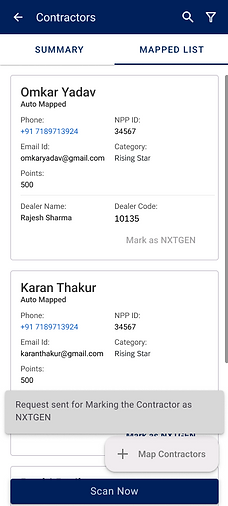
Contractor-related sub-categories are grouped within a dedicated drawer, allowing FSRs to quickly orient themselves within contractor contexts while keeping the homepage focused on execution tasks.
Immediate confirmation provides feedback and a quick reversal window, reducing accidental actions while maintaining a low-friction mobile experience.


02. Admin Portal (Web Application)
Admins are provided with extended oversight, where they can view both the complete contractor list and a dedicated NXTGEN Contractor's Request queue
Advanced geographic filtering mirrors enterprise hierarchy, reduces list noise, and lets managers segment contractors in <10 seconds with clear region-level accountability.

Structured data table with key columns and secondary details nested beneath each row to maintain high-density data while preserving readability
Tab segmentation separates the Contractor List from NXTGEN Service Contractor Requests, isolating operations from approvals to prevent task mixing.
Compliance visibility flags Rejected and Not Submitted statuses in red to instantly surface approval blockers and compliance risks


Design System
We developed a custom component library within the SAP UI 5 to bridge the gap between design and development.
Filter Section

List

List with Actions
Performance Summary Charts

Card Layouts

Dialog

Alert Message Box
Dialog
Form

Button Interactions


Bottom Menu Drawer

Filter (Mobile)

Bottom Filter Drawer
Learning & Iteration
Before
Initial Model
-
The approval flow was initially designed for two core personas: FSRs and Territory Managers, using a streamlined, linear request–approval model
-
The focus was on speed, minimal input, and a consistent mobile UI to reduce on-ground delays and support fast, predictable field decision-making
After
Scaled System Design
-
Re-entered discovery to reassess system constraints following scope expansion, ensuring the solution remained aligned with evolving business and governance requirements
-
Evolved the system into a role-aware yet interface-consistent framework, introducing layered capabilities such as supervisory views, parallel approval lists, and admin-level interventions without fragmenting the user experience
-
Preserved usability and adoption for field teams while enabling organisational oversight, scalability, and long-term governance through a single, extensible UI